What size should your Shopify product images be
The question comes up every week in merchant forums. The answer is one dimension plus a nuance almost nobody explains.
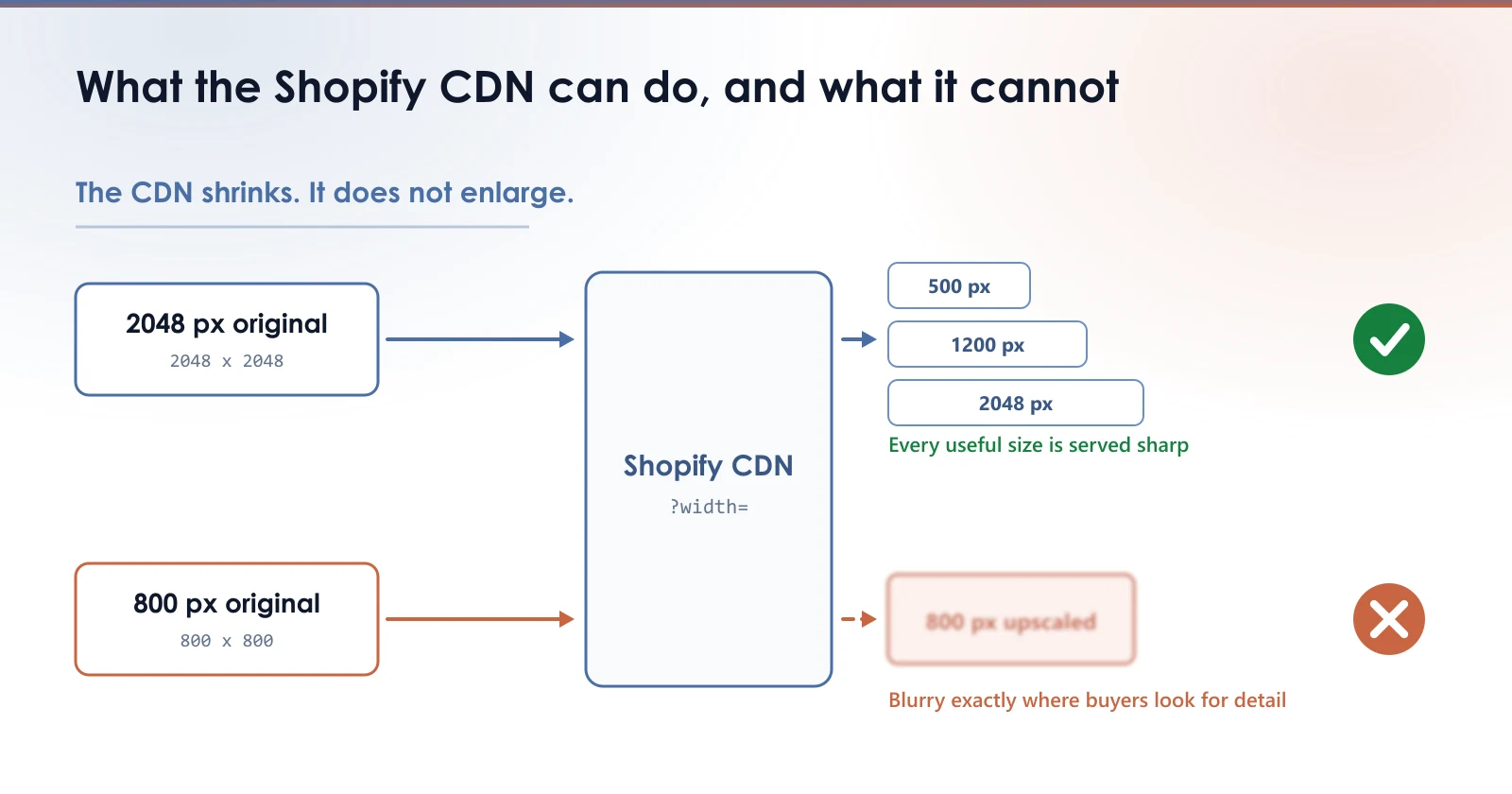
Shopify serves your images from its CDN and can resize them on demand. You have probably seen those URLs ending in ?width=800: that is exactly this mechanism. The theme asks for a width, the CDN produces it and caches it.
Direct consequence: the size you upload is almost never the size your visitors download. But it sets a ceiling. The CDN can shrink, it cannot invent pixels that were never there.
The dimension to aim for
For a standard product page, 2048 pixels on the longest side covers every useful case: the collection thumbnail, the main image, and zoom on high density screens.
| Use | Width requested by the theme | Minimum source |
|---|---|---|
| Collection thumbnail | 300 to 500 px | 1000 px |
| Main product image | 800 to 1200 px | 1600 px |
| Hover zoom | 1500 to 2048 px | 2048 px |
| Retina screen (2x) | double the CSS size | 2048 px |
Why uploading bigger achieves nothing
Past 2048 px you add weight to your library without changing anything for the visitor: the theme will never request that width. A 5000 px file weighs several times a 2048 px one, for an identical rendered image.
That weight is not invisible either. It slows the Shopify admin, inflates your exports, and lengthens every process you run over it.
A CDN can shrink an image. It cannot rescue one that was uploaded too small.
The opposite mistake, which is worse
Uploading at 800 px because that is the displayed size is a false economy. On a Retina screen the theme requests double. Since the CDN cannot enlarge, it serves your 800 px stretched: the image looks soft precisely where the buyer is inspecting product detail.
- Too large: wasted storage, no visible effect for the buyer
- Too small: unfixable softness on modern screens
- 2048 px: the only setting that costs you nothing on either side
Checking what you already have
A file's dimensions are visible in your Shopify admin. Open the product, click an image in its media: the preview shows the size of the file as you uploaded it. That is the value that matters, because it is the CDN's starting point.
Product by product, this is reliable but slow. On a catalog of a few hundred products nobody does it, which is exactly why undersized images go unnoticed for years.
Measure your own images
The free audit reads your store and gives you the real weight of your product images, with nothing to install.
Read next
- The filename of your Shopify product imagesShopify has no way to rename an image once it is uploaded, and a renamed image gets no redirect. What is worth fixing, and what is not.
- SEO title and meta description on a Shopify product pageShopify does not fill these two fields for you, so Google writes the snippet instead. Where to find them, what to put in them, and how to check your store in one minute.
- WebP, JPEG or PNG: which one for ShopifyThree formats, three uses that do not overlap. The wrong pick doubles a product page weight without anyone noticing.