What's new
What changes in PixelUnik, from your store's point of view.
Internal changes, fixes with no visible effect and incidents do not appear here.
-
Improved
The free audit now reads your whole catalogue
The public audit on pixelunik.com only looked at a few pages. It now also queries the store catalogue, which gives a far more accurate alt text count: alt attributes are counted, not estimated from a sample.
- The report separates what your visitors download from what your library contains. The two measures are never added together.
- Images carrying
alt=""are no longer counted as missing alt text: that is the recommended way to mark a decorative image.
-
New
Choose the language of AI generated text
An explicit setting controls the language of AI generated alt text and SEO metadata. The language used to be inferred, which could produce text in your admin language rather than your storefront language.
- By default the language follows your storefront, not your admin interface.
- The processing log records which language was used for each generated text.
-
Improved
Settings reserved for a higher plan now explain what they do
A setting unavailable on your plan used to appear greyed out with no explanation. It now states what it does and which plan unlocks it, so you can decide knowingly instead of guessing.
-
Improved
Regenerating an alt text really does give a different result
When an alt text suggestion did not fit, regenerating it often returned an almost identical text, for the same credit. The model now takes the suggestions you already rejected into account, so it produces a genuinely different wording. The tone setting is applied to generated text as well.
-
New
Comparison pages with the other apps
The site compares PixelUnik with the other Shopify image optimisation apps, feature by feature, with one page per competitor and a set of frequently asked questions.
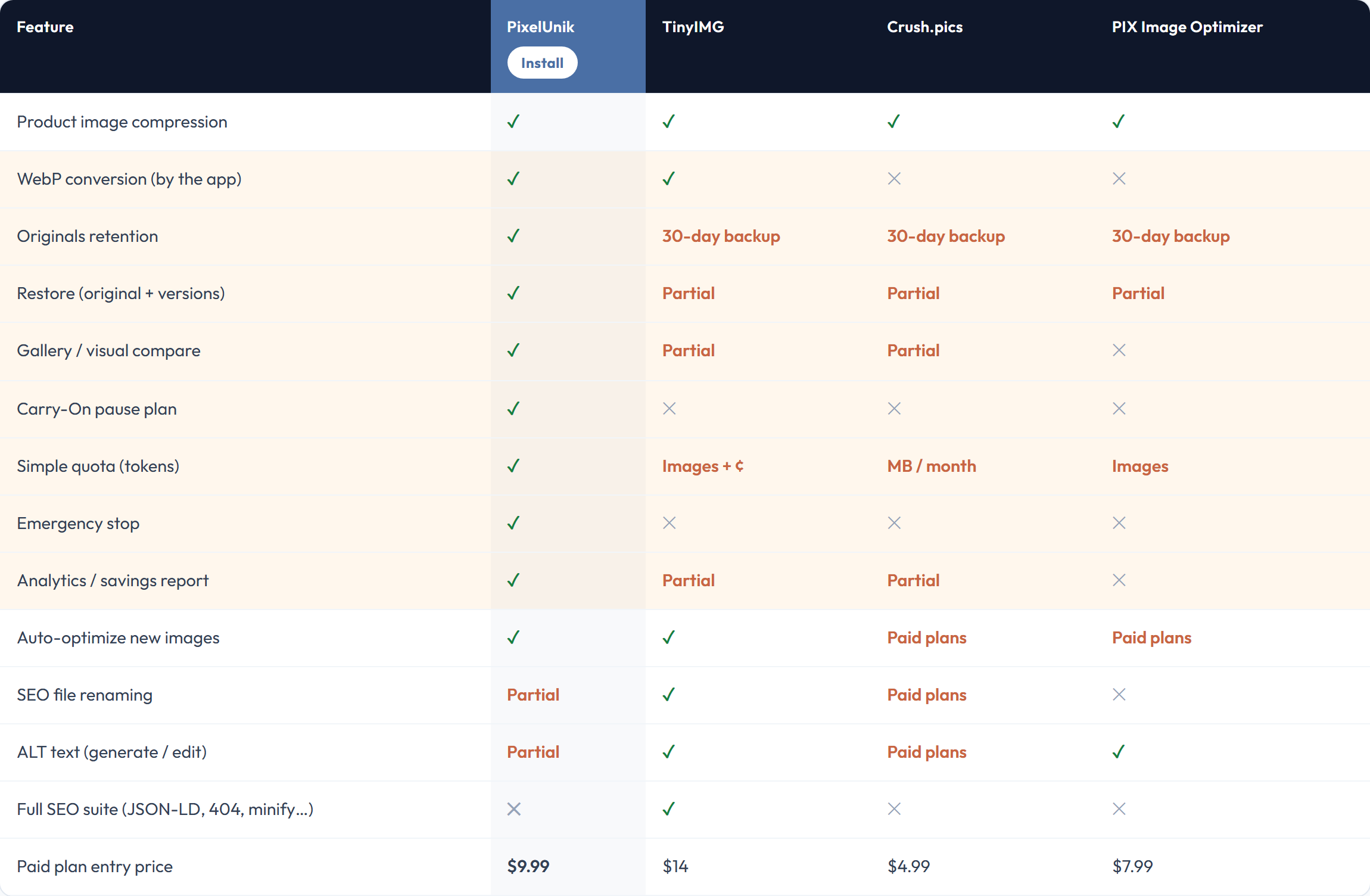
The table also shows the rows where PixelUnik offers only partial support, or none. -
New
AI generated product SEO metadata
On top of image alt text, PixelUnik drafts the SEO title and description of a product page from its actual content. Every generation can be reviewed before it is written to your store: nothing is published without your approval.
-
Fixed
Distinct alt text for each image of the same product
Several images of the same product could receive identical alt text, which helps neither Google Images nor a screen reader. Each image now gets its own description.
-
Fixed
SEO editor: more reliable navigation and Google preview
In the SEO editor, filtering images without alt text could bring up a login screen, and there was no way to go past the first hundred images. The Google preview also showed the technical myshopify.com address instead of the store's real domain. - Filtering or changing page no longer loses your session. - The Google preview shows your real domain.
-
Milestone New
Per image SEO editor
A dedicated SEO tab brings alt text, file name and page metadata together in one place, with a preview of how the result looks in a search results page. The instructions given to the AI can be customised per store.
-
Improved
The gallery re-syncs after reverting to the original
After restoring a product's original image, the gallery still showed the previously optimized version until the next refresh. The product is now re-synced automatically, so what you see matches what your store serves.
-
Improved
Bulk jobs hold up better on large catalogues
Bulk image processing accounts for the rate limits Shopify imposes and slows itself down before reaching them, instead of failing. Stores with a large library run into fewer errors during a bulk optimisation.
-
New
Skip images that are already light enough
A setting defines a file size below which an image is left alone. The dashboard separates the images still to process from those already under the threshold.
-
New
Edit an alt text by hand, at no credit cost
The alt text of each image can be edited directly from the gallery preview, without spending a credit. An explicit save button confirms the change.
-
Improved
Live progress for bulk jobs
A progress bar appears during a bulk optimisation or a bulk restore, from the dashboard, the gallery and the suggestions page. The gallery refreshes on its own once the job is done, without reloading the page.
-
New
Delete previous optimised versions
A previous optimised version can be deleted, one at a time from the history of an image, or in bulk for several images selected in the gallery.
-
New
Automatic optimisation offers to catch up on existing images
Turning on automatic optimisation only applied to images added afterwards. If existing images are not optimised yet, a banner now offers to process them in one click at the moment you turn it on.
Not using PixelUnik yet
Start by measuring: the free audit reads your store and gives you the real weight of your product images.